In terms of complexity: Machine learning < Deep learning < … < generative artificial intelligence. A “grading bot” is likely to be some kind of classifier algorithme, closer to deep learning than a full LLM enables GenAI tool.
Sam Altman, CEO of OpenAI on what ChatGPT, during the Town Hall held on January 26th 2026, on what ChatGPT fails to do well: creativity; intuition; judgment (at 27th minute of video). Mindset for humans using GenAI: abundance; resilience; collaboration (ibid).
Tour de table
Please answer the following questions:
What is your name?
How would you self describe your own knowledge and comfort using Gen AI?
you are a senior librarian working in a large metropolitan canadian university. You need to lead a workshop on generative ai for the benefit of teaching faculty in the accountancy department. could you identify a list of 10 simple action items that faculty may explore tomorrow to upskill on gen ai use in their praxis and make for a future ready teaching strategy
Response
Absolutely—here’s a practical, low-barrier set of 10 action items accountancy faculty can try immediately to build confidence with generative AI and begin integrating it into teaching in a responsible, future-ready way.
10 “Start Tomorrow” Actions for Accountancy Faculty
1. Draft Better Lecture Outlines in Minutes
Paste a syllabus topic (e.g., revenue recognition, auditing standards) into a GenAI tool and ask:
“Create a 60-minute lecture outline for undergraduate accounting students, including examples and discussion questions.”
✅ Benefit: Saves prep time and introduces new ways to structure content.
2. Generate Realistic Practice Problems
Ask AI to:
“Create 5 intermediate-level problems on lease accounting with solutions.”
✅ Benefit: Quickly expands problem banks and supports differentiated learning.
3. Create Case-Based Learning Scenarios
Prompt:
“Generate a short case where a company faces ethical issues in financial reporting.”
✅ Benefit: Supports critical thinking and aligns with CPA competencies.
4. Simplify Complex Concepts for Students
Paste a dense accounting standard and ask:
“Explain this in plain language for first-year students.”
✅ Benefit: Improves accessibility and inclusive teaching.
5. Design In-Class Activities
Prompt:
“Create a 20-minute group activity on internal controls for a class of 40 students.”
✅ Benefit: Encourages active learning without extensive prep.
6. Build Rubrics Quickly
Ask:
“Create a grading rubric for a financial analysis assignment, including criteria and levels.”
✅ Benefit: Standardizes grading and saves time.
7. Generate Multiple Versions of Assignments
Prompt:
“Create 3 slightly different versions of this accounting problem for academic integrity.”
✅ Benefit: Helps reduce cheating while maintaining fairness.
8. Use AI as a “Student Simulator”
Ask:
“Act as a student and ask questions about cash flow statements.”
✅ Benefit: Reveals likely student misunderstandings in advance.
9. Provide Feedback on Student Writing (Drafts)
Paste anonymized student work and ask:
“Suggest constructive feedback on clarity and argumentation.”
✅ Benefit: Speeds up feedback cycles while maintaining quality.
✅ Benefit: Builds digital literacy and academic integrity awareness.
Bonus: A Simple First Prompt to Try
If faculty only try one thing:
“I am teaching intermediate financial accounting. Generate a short, engaging classroom example explaining deferred tax liabilities, including numbers and a step-by-step explanation.”
Framing for Faculty
Start small—augmentation, not replacement
Focus on efficiency + pedagogy
Emphasize critical evaluation of AI outputs
Align with professional standards (e.g., CPA competencies, ethics)
If you’d like, I can also turn this into a 1-hour workshop plan, slides, or a hands-on exercise sheet tailored to your department.
Every fall brings a new cohort of exceptional students to Concordia University’s John Molson School of Business. I have been asked to present, very succinctly, the library services and collections afforded to them upon joining us. They are in for quite a treat!
In fact, the library may seem a bit overwhelming to new students, given the breadth and depth of support to provide. So, I have prepared a short list of essential support provided by the library and librarians, specifically tailored for new graduate students. When in doubt, start with these elements.
The library website is your portal to our services and collections
Sofia, our NextGen search engine, covering the print and digital collection (with partial coverage of our market & industry resources). Search for academic articles and books here.
Blue “ribon” – below Sofia – provides for quick access to popular resources: Databases by subject; eJournals; Citation guides
Information for graduate students (we will cover these points in further detail below)
In Sofia and most article databases, you can upload bibliographic data directly to your own account on Zotero.
Organize your readings in folders for your seminars as well as chapters to your thesis. Create your own abstracts and reading notes in special fields.
You can create bibliographies automatically in hundreds of citations styles with the click of a button in your favorite. Check out our GradProSkills workshops on Zotero (or search YouTube!)
Be at the forefront of your discipline by harvesting RSS feeds on a special app or website. Subscribe to the table of contents of journals (find the RSS feed address on the Journal publisher’s website), setup an alert in article databases like ProQuest or enjoy webcomics for academics (like https://xkcd.com/)
TOC: Learn how to create a Table of Contents automatically in any word processing software… you need to encode your document properly
Fall 2020 will bring a new cohort of exceptional students to Concordia University’s John Molson School of Business. I have been asked to present, very succinctly, the library services and collections afforded to them upon joining us. Please find below the outline of my presentation, with corresponding links.
The library website is your portal to our services and collections
Sofia, our NextGen search engine, covering the print and digital collection (with partial coverage of our market & industry resources). Search for academic articles and books here.
Blue “ribon” – below Sofia – provides for quick access to popular resources: Databases by subject; eJournals; Citation guides
Information for graduate students (we will cover these points in further detail below)
In Sofia and most article databases, you can upload bibliographic data directly to your own account on Zotero.
Organize your readings in folders for your seminars as well as chapters to your thesis. Create your own abstracts and reading notes in special fields.
You can create bibliographies automatically in hundreds of citations styles with the click of a button in your favorite. Check out our GradProSkills workshops on Zotero (or search YouTube!)
Be at the forefront of your discipline by harvesting RSS feeds on a special app or website. Subscribe to the table of contents of journals (http://www.journaltocs.ac.uk/), setup an alert in article databases like ProQuest or enjoy webcomics for academics (like https://xkcd.com/)
TOC: Learn how to create a Table of Contents automatically in any word processing software… you need to encode your document properly
As one of the librarians taking care of the John Molson School of Business at Concordia University, I am responsible for supporting two of the five departments, namely Marketing and Management. Over a decade ago, I embarked on an initiative to transform my library service, leveraging blended pedagogy to provide Open Educational Resources for my community. Learning to use a library and trusted resources is the original (dare I say canonical) experiential learning activity. This simple fact is sometimes forgotten…
In short, my pedagogical delivery strategy involves curating a set of short videos (5 to 10 minutes), hosted on YouTube and embedded in an instructional website. These videos cover using specific databases to empower learners to succeed in their classroom activities. These videos also provide insight on search strategies and skills applied to the Canadian business environment. Students can discover these videos and corresponding web pages through direct links in the Moodle instance for their course, through subject guides on the library website or, more improbably, by searching on the Internet. I currently have about three dozen videos in active use.
JMSB provides for some distinct challenges in devising a library learning program. An entering cohort of new students has around 1500 undergraduates. Class sizes are capped at 60, which means that a required course would have up to 55 sections a year, spread over 5 semesters (fall and winter, as well as 3 spring/summer terms). In the past, I would strive to visit as many course-sections as humanly possible, sometimes providing up to 5 library lectures per day. These 60 to 90 minute lectures were provided to a handful of select courses, so each time a teaching faculty would request a library lecture, I would attempt to secure a visit in all sections. Other librarians would pitch in. My records would indicate that we would only visit about a third of course-sections as many teaching faculty would not allocate classroom time for our visits, for a handful of courses.
As I gained experience with my community, I became increasingly aware that the 60-90 minute lecture was neither systematic, nor sustainable. Blended learning, in the form of embedded video lectures on course-related websites, was the strategy I determined to be the most appropriate.
Given the current context, this asynchronous pedagogical strategy is more than necessary.
This video showcases my method or protocol to prepare quick & easy videos for my learners. I am a librarian working in a University in Canada and I use free software, namely Quicktime, to produce these instructional support materials. This video is hosted here: https://youtu.be/62sy1xJG4YY
Here is the outline of the video:
1. Before you begin: Create a new user account; Fix accessibility settings; Lights, camera, outline
2. During the video capture: Be yourself, pretend a friend is with you; 10 minutes max; Don’t edit, throw away & start over
3. Post production and uploading: This outline is your description on YouTube; Use YouTube’s tools for post production
I have prepared a 10 minute video about how I produce my instructional videos. It has taken me about a decade to arrive at this workflow, I’ve transformed my practice long ago to harness the potential of new technologies, tools and platforms. My goal is to share with you my playful and underwhelming method to make simple but useful videos.
Please don’t feel like you should put yourself “out there” as I have. As a middle-aged, overqualified and, well, tenured, white male, I am well aware that I can leverage many factors in my favour to curate an Internet persona. Please focus on the production method (QuickTime hack & inexpensive computer equipment), not the dissemination strategy (YouTube & posting on a blog available on the Internet).
I simply use QuickTime, my old computer with an onboard mic and camera and zero editing (ok, I have a nice external microphone which is 10 years old, but you really don’t need it). It is available on my YouTube channel and embedded in my work blog, at this address: https://youtu.be/62sy1xJG4YY
Of course, this is the workflow I’ve implemented for my own practice in supporting my community: hundreds of faculty and thousands of students from the Marketing & Management departments of the John Molson School of Business at Concordia University. These diverse and energetic colleagues and learners require a special kind of library service, which goes well beyond the canonical book-article paradigm of librarianship. (Actually, most of my colleagues go well beyond the book-article paradigm, but I need to speak to what people perceive librarians to be).
I say this because there are passionate and smart people working on various “video production workflows” at my institution, Concordia University, and elsewhere. Please consider this video as “a” possible method, the one I’ve crafted that I am now sharing with you. It works for me and maybe you’ll feel empowered or inspired to try your hand at creating your own videos… Please remember to consult with your institutional experts about best practices that are meaningful for your local community.
This post contains the lecture notes I will be using in an honors level undergraduate class. Remember, the library offers a Business Research Portal.
1. Is there information on the Internet?
Lecture; 10 minutes
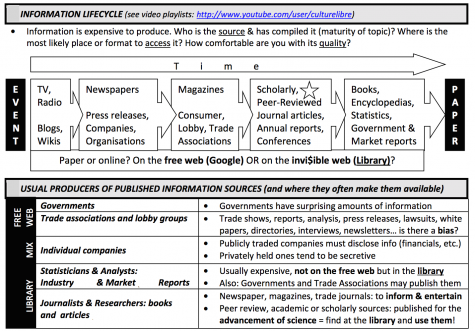
Synthesis: Information (or more precisely: facts, opinions and data) is contained in documents. Documents may be posted on the Internet or published in electronic or print venues accessible through subscriptions or other forms of payment. A successful search for information implies thinking about (1) the motivations of those creating documents (e.g.: the goal) and their (2) expectations about posting on the internet or publishing in paid-for venues (e.g.: the source).
2. Compare articles
Activity; 10 minutes; Compare articles from various sources: blog, magazine, trade journal, Wikipedia, subject encyclopedia and scholarly journal
Focus: distinction between free or invisible (library) web
Synthesis: all articles are not created for the same audiences. Academic or peer-reviewed articles are the standard way to publish research results. University students are groomed to craft academic articles through writing papers as part of the requirements for their classes
3. Academic articles: structure and editorial process of scholarly communication
Lecture; 10 minutes
Synthesis: Structure & Editorial process of scholarly communication.
Structure of an academic article: research questions; conceptual framework; hypothesis/objectives and method; data & analysis; conclusion (very similar to an academic paper)
Process: peer review
4. Tools & strategies
Activity: 20 minutes
Transforming concepts to keywords for database searching
Compare Google Scholar and a library article database
Working from a known item – read the bibliography and explore related articles. Locate the article in a database and obtain keywords
Data sources on the Internet – be mindful of secrets
Here is a draft outline I just created for a professor teaching an entrepreneurship class for Fine Arts students. Caveat being that these students are not business majors, so we have to spend more time explaining why each resource is useful and how to incorporate these sources in their assignments. Also, the bit about copyright is because they are Fine Arts students and the professor wanted me to cover this as well.
–> Please make sure students bring their devices or borrow laptops from the circulation desk to LB-322 <–
->Total duration: 150 minutes, which leaves room for a 15 minute break <-
1. Basic business & industry information
(20 min)
– Browse NAICS codes related to Fine Arts, enable students to discover their codes by engaging them to state their line of business
– Show the IBIS World system and present a sample report (uses NAICS codes)
– Show the SME Benchmarking system and a sample report (uses NAICS codes)
ACTIVITY: have students retrieve the IBIS World & SME Benchmarking reports. Troubleshoot NAICS codes & interface issues.
(15 minutes)
2. Basic market information
(15 minutes)
– Passport GMID
– PMB
ACTIVITY: Can you identify one trend or statistic that can impact your project from either source?
(10 minutes)
3. Stats Can
(15 minutes)
– Census: know your neighbours!
– CANSIM: Household spending & more
– Mention SimplyMap but do not show it
ACTIVITY: What is the average household spending for your product? How do you define your market (geography, demographics, etc.)?
(10 minutes)
4. Articles (trends, major players…)
(20 minutes)
– ProQuest
– Business Source Complete
ACTIVITY: Locate one article (news, trade or academic) which relates to your project.
(15 minutes)
5. Copyright
(10 minutes)
– What does copyright mean for you?
– Using copyrighted content as part of your work
ACTIVITY: Read the terms of use of Facebook with the class. Engage in conversation with them about what this means. Focus on when they post their own content on FB & when they post content from others (without their consent). Orient the conversation to the distinction between professional work versus academic or personal projects (ethics, values, rules).
The Library Instruction Round Table (LIRT) or the American Library Association has announced the opening of two award nominations, one for a librarian and another for a library. Deadline is January 15th 2014.
Stowe, B. (2013). Designing and implementing an information literacy instruction outcomes assessment program. College & Undergraduate Libraries, 20(3-4),
242–276.
This case study describes and analyzes the efforts of the library faculty at the Brooklyn Campus Library of Long Island University who are involved in developing, testing, and implementing a ground-up information literacy outcomes assessment program for the undergraduate core curriculum. Based on the increasingly prominent role given to information literacy by re-accreditation agencies, the library was prompted to significantly upgrade its assessment practice of collecting anecdotal evidence and administering clickers-based exit surveys. To detail the process of the upgrade, the article discusses such issues as key external and internal institutional forces that influence the development of an outcomes assessment programs. The library faculty members discuss choosing the appropriate assessment instrument (standardized or locally developed), establishing a hierarchy of priorities of assessment areas/goals, determining the actual assessment questions, and building the iterative assessment cycle (pre-assessment and post-assessment). The author includes examples from early versions of the evaluation instruments as well as the revisions of such instruments. The honesty of the library faculty members is disarming—they freely refer to the persistent personnel and managerial issues their library had been facing for some time and are generally very open about the challenges this represented in terms of developing a sustainable assessment program. As a result, this article provides an invaluable resource for other institutions trying to build their outcomes assessment program from scratch.